
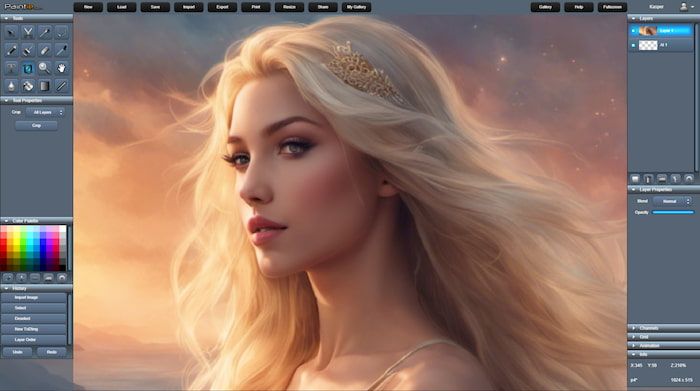
Features overview
- Layer based compositing, with support for Alpha, Add, Screen, Multiply, Subtract, etc. blend modes.
- Fast, real-time GPU accelerated image filters, procedural filters and adjustment layers.
- Searchable Filter browser with real-time preview.
- Simple, responsive GUI. Dark skin for minimal distraction.
- Fully skinnable. 3+ optional custom skins available.
- Unlimited Undo / Redo stack and browsable History view.
- Image based brush tools with softness/spacing and scale, orient and orient+scale drawing modes.
- Support for 8 bit (sRGB) and 16 Bit (Linear) floating point layer format (HDR), with Exposure and Gamma parameters.
- Procedural pen tools for realistic artistic sketching.
- Pixel Perfect Pen Tool option that avoid jagged lines in Pixel-Art.
- Layer editing, Duplicate, Merge Down, Flatten, Flatten All, Delete, Center, Move and Move to Front/Back/Group.
- Layer Selection using Select Layer or Select Flattened or by Ctrl clicking on layer pixel with the Move tool.
- Support for layer Groups with adjustable opacity and blend modes.
- Eye dropper tool which can sample color from Image, Current Layer and Current+Below.
- Pressure sensitive drawing with devices such as Wacom Tablets, Microsoft Surface and the Apple Pencil/iPad Pro.
- Support for high frequency device input (Coalesced input events).
- Optional Brush and Pen stroke smoothing.
- Blur, Smudge, Clone tools for high quality, fine control Gaussian blur / smudging and stamping.
- Line, Rect and Oval drawing tool with optional outline, and antialiasing.
- Fast Image Crop tool, that can either crop All Layers, Current Layer or Canvas Only.
- Support for attachment layers, so Filters, Masks and others layers can dynamically alter or adjust top-level layers.
- Gradient tool with optional Dither.
- Mask selection and Cut/Copy/Copy Merged/Paste.
- Support for storing selections in Layer Masks that can optionally be attached to other layers.
- Replaced or Additive Rectangular/Circular, Magic Wand, and Lasso/Polygonal Mask selection.
- Cut and Paste between different instances running in separate browser tabs, and/or to native applications.
- Scale and Rotate image selection with Nearest Neighbour, Bilinear or Bicubic filtering.
- Optional Component and Parameter Tooltips.
- Mask selection scale and rotate tools for image resizing, rotation and mirroring.
- Import existing images by pasting external clipboard or simply drag/drop images to canvas.
- Imports PSD, PNG, JPG, GIF, BMP, TGA, PCX, HDR, EXR, WEBP, AVIF, JFIF and SVG formats.
- Exports PNG, JPG, BMP, TGA, PCX, HDR, EXR, WEBP, AVIF and GIF.
- Full support for alpha transparency in PNG, TGA, and BMP formats.
- Fast export of PNG, JPG, WEBP and AVIF, size-optimized for Web.
- Can import animated GIFs as animated FlipBook layer.
- Vector based Text layers with TrueType fonts, adjustable size, outline and spacing.
- Support for Vector layers (from imported SVGs), that can be moved, scaled and rotated.
- Support for cross-device installation of custom TrueType fonts.
- Editable Color Palette, with Color Palette Picker so you can Save / Load your own color palettes.
- Fast high quality image resizing using Nearest Neighbour, Bilinear, Bicubic and Lanczos resampling.
- Custom Canvas Resizing with alignment control of existing layers.
- Support for Video Layers with Rate and Loop options (WEBM, MOV and MP4).
- Support for Audio Layers with Loop option (MP3, M4A, OGG and WAV).
- Full support for transparency / alpha channel and RGBA channel masking / editing.
- 32 bit floating point blending and frame buffer support.
- Up to 16K x 16K image resolution.
- Info view showing cursor position, mask size and position, filename, zoom and image resolution.
- Move tool guide-snapping option to snap movable layers to center and/or borders.
- Text-To-Image AI image generation, featuring style, resolution, steps, strength, and custom seed options. (PRO Only)
- Customizable Grid, with crosshair, size, offset and snap options. (PRO only)
- Optional Autosave to local storage at customizable intervals. (PRO Only)
- Frame based animation support, with adjustable FPS and loop options and frame scrubbing slider. (PRO only)
- Exports animation to PNG flipbook, animated GIF, WEBM video, MP4 video or ZIP compressed PNG frames. (PRO only)
- High quality video export support (WEBM and MP4) with optional sound transcoding (WEBM). (PRO only)
- Support for exporting mixed audio as .WAV file. (PRO only)
- Support for exporting history timelapse as animation. (PRO only)
- Save and store your work online for easy access from anywhere. (10GB storage for PRO only)
- Customizable window docking and layout.
- Resize GUI to take advantage of HiDPI / Retina resolutions.
- Mobile Mode for easier editing on mobile and touch devices.
- Customizable GUI opacity.
- Fullscreen support, and selectively hide GUI elements for minimal distraction.
- Manage your own public art gallery. Share and publish your artwork online, directly from within the browser.
- Instantly share artwork on social networks: Facebook, X (Twitter), Google, Pinterest or through Email.
- Standardized hotkey mapping for easy access to common functionality and tools.
- Cross platform and cross browser compatability. WebGL 1.0 and 2.0 compatible.
- Fast & Lightweight. Less than 400KB download.
- Runs in your browser, no download - no install - no upgrades - always latest version.
- Installable as Progressive Web App (PWA), running in a standalone window just like a native app.
- Easily sign-up and login online with custom username.
- Filters supported: Bilateral Blur, Bleach Bypass, Bloom, Blur, Bokeh, Bulge, Color Balance, Color Curves, Color Tint, Color Tone, Color Transform, Contrast, Crosshatch, CRT, Desaturate, Downsample Blur, Dream, Emboss, Feedback, Filmic, Frame, Gamma, Gaussian Blur, Highpass, Histogram, Hue+Saturation, Ink, Invert, Kaleidoscope, Lens Flare, Lens, Lighten , Mirror, Mosaic, Motion Blur, Noise, Normal Map, Outline, Perspective, Pinch, Polar, Posterize, RGB Split, Ramp, Ripple, Rotate+Scale, Sepia, Starfield, Threshold, Tunnel, Twirl, Vibrance, Vignette, Wobble and Zoom. Previews: https://paintie.com/web/filters
- Blend modes supported: Normal, Add, Screen, Multiply, Subtract, Difference, Darken, Lighten, Overlay, Hard Light, Color Dodge, Color Burn, Linear Light, Vidid Light, Pin Light, Dest Over, Replace, Replace Color and Replace Alpha.